
AI readiness: the 11 domains to prepare your development team for AI
Specs, rules, skills, tests, security: the AI readiness framework in 11 domains and 4 levels to let AI work safely and efficiently in your codebase.
 Tech · 12 min
Model, harness, tools, MCP, skills, agent: AI vocabulary piles up faster than anyone can learn it. This guide explains it without jargon, with one image that holds from start to finish: a Michelin-starred kitchen. Whether you are simply curious or a developer who already uses Claude Code without mastering every concept, you will finally know who does what.
An AI agent is the combination of two things: a language model (the chef) and a harness (the kitchen around it). The model can only produce text. The harness gives it tools (the utensils), runs what it asks for and reports the result back. MCP servers play the role of outside suppliers, and skills that of recipe cards stored on the shelf.
The kitchen analogy was popularized by Theo Browne, creator of T3 Code, in a piece explaining what a harness is. At Fragments Studio, we adopted it to train our clients: it holds up much further than you would expect. Here is the full map of the kitchen before we get into the details.
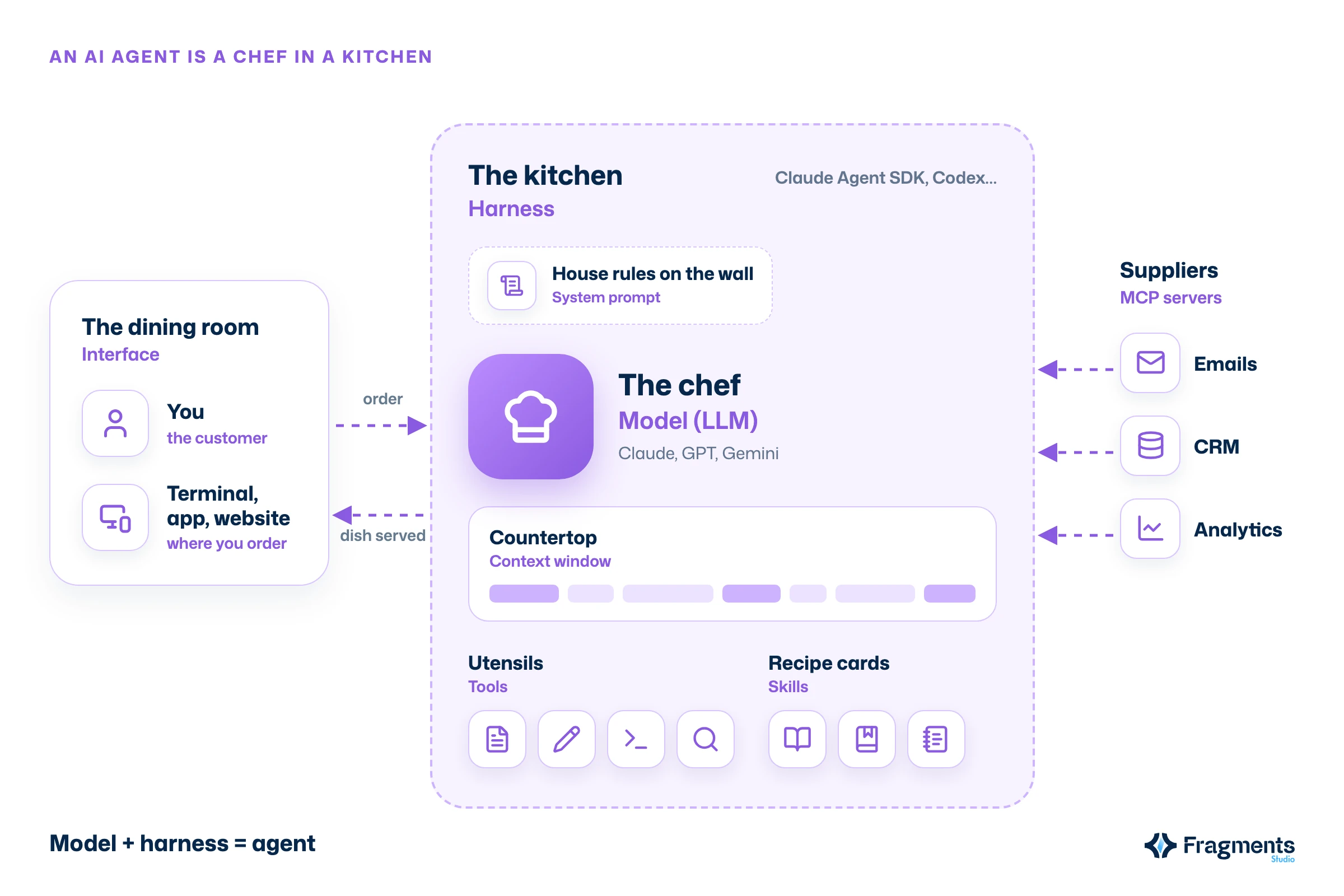
A language model, or LLM (Large Language Model), is a program trained on huge volumes of text to predict the most likely continuation of a given text. Claude Opus, GPT and Gemini are models. This is the chef: immensely talented, trained over a long apprenticeship, but able to do only one thing. Talk.
On its own, a model cannot open a file, browse a website or send an email. It can describe a dish perfectly, but it has no hands, no oven and no fridge. Everything it "knows" comes from its training, frozen at a specific date: it is a chef fresh out of a long apprenticeship who has not read the news since.
You also need to tell the chef apart from the restaurant. Claude is a family of models. Claude.ai, the Claude app and Claude Code are products built around those models. The same goes for GPT and ChatGPT.
The context window is the amount of text a model can take into account at once: the order, the instructions, the documents provided, the tool results and the whole conversation. It is the chef's countertop. Whatever is not on it, the chef does not see.
This countertop is measured in tokens, chunks of words of roughly three to four characters. It is large, often several hundred thousand tokens according to Anthropic's documentation, but it is not infinite. A cluttered countertop means a chef who works less well.
Finally, the system prompt is the house rules pinned to the kitchen wall: the tone to use, the rules to follow, the things never to do. The customer never sees them; the chef rereads them at every service. To write the order itself well, see our guide to prompt engineering.
A harness is the software layer that surrounds a model and lets it act: it presents the available tools, spots action requests in the model's responses, runs the matching code and sends the result back. It is the kitchen. Without it, the chef remains a brilliant talker; with it, the chef cooks.
In practice, the model can still only write text. So we agree on a format, an "order ticket" it knows how to write:
<read_file name="menu.md">
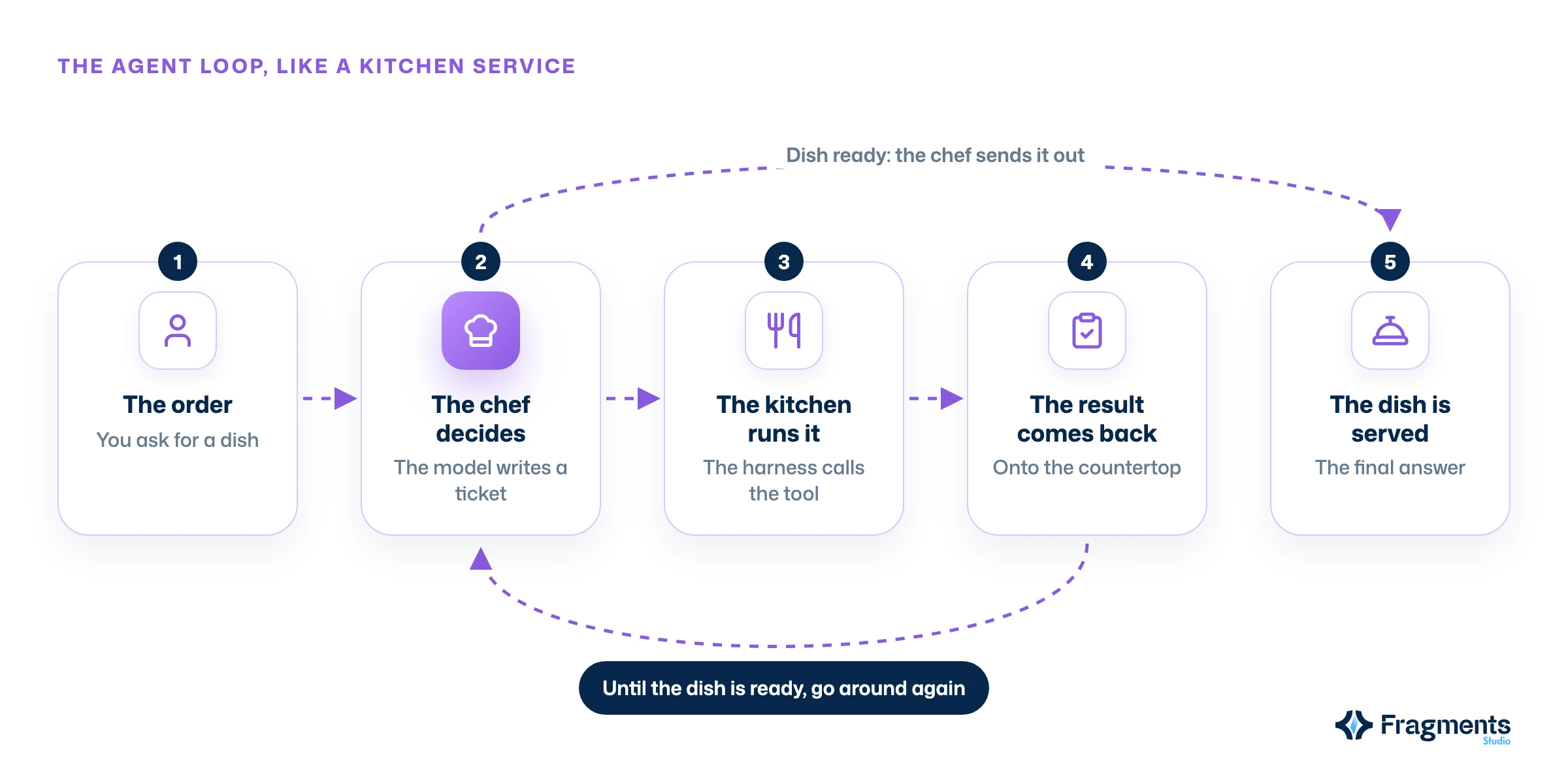
This text, on its own, does nothing: it is like typing on a keyboard while the computer is off. Someone has to read it and act. For a model to actually do things, you therefore need five elements, which together form the harness:
These steps run in a loop: the chef asks for a utensil, the kitchen carries it out, the result lands back on the countertop, and the chef decides what comes next. Until the dish is ready.
Partly. Claude Code has two sides: the interface (the terminal, the Code tab of the app) and the harness running underneath, the Claude Agent SDK. The interface is the restaurant's dining room: where you order and where the dish arrives. The harness is the kitchen, which the customer never sees.
The distinction matters, because the same kitchen can serve several dining rooms. T3 Code, for example, relies on the Claude Agent SDK and on the Codex app server: it does not cook itself, it lets you pick your kitchen. Our complete guide to Claude Code covers the tool from the user's side.
All three extend what the agent can do, but not in the same way. A tool is a kitchen utensil: its code runs on site. An MCP server is a supplier: the code runs elsewhere and the kitchen places an order. A skill is a recipe card: written know-how that the chef only opens when needed.
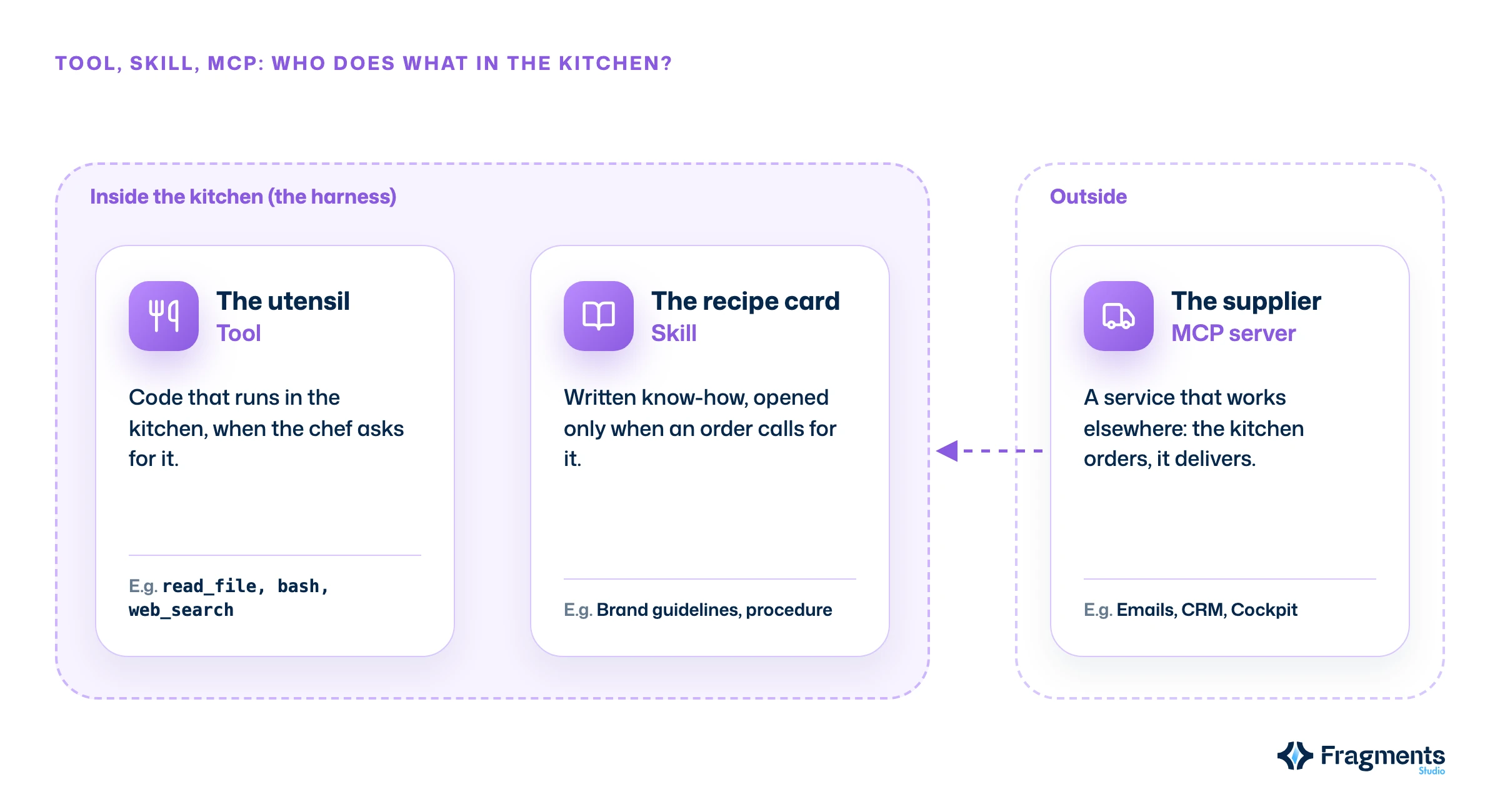
A tool is a function the harness makes available to the model, with a name, a description and parameters. The most common ones are called read_file, edit_file, bash or web_search, and recent models are trained to use them.
No kitchen has every utensil every chef dreams of. Good harnesses start from that fact and let you add your own: Claude Code and Codex ship with many, while other harnesses such as Pi stay deliberately minimal. One important detail: neither you nor the model "sees" the tools. The harness exposes them to the model (through the list) and to you (through the interface).
MCP (Model Context Protocol) is an open standard that lets an agent use outside services: your email, your CRM, your analytics, your project management tool. Where a tool runs code inside the kitchen, an MCP server sends a request to another system, which does the work and returns the result.
It is the supplier the kitchen calls: the cheesemonger does not come in to cook, they deliver what you order. Launched by Anthropic in November 2024, MCP was handed over in December 2025 to the Linux Foundation's Agentic AI Foundation, with more than 10,000 active public servers at that point. At our studio, Claude goes through an MCP server to read and update tasks in Cockpit, our management software.
Theo Browne compares MCP to a cookbook instead. We prefer to keep the recipe for skills: MCP brings a capability that lives elsewhere, not know-how.
A skill (Agent Skill) is a folder containing a SKILL.md file (a name, a description and instructions), along with scripts and resources if needed. It teaches the agent a precise way of doing something: following brand guidelines, applying a procedure, producing a document format.
Their strength lies in how they are stored. At startup, only the name and description of each skill sit on the countertop; the chef opens the full card only when an order calls for it. Anthropic calls this principle progressive disclosure: you can store dozens of recipes without cluttering the kitchen. The illustrations on this blog, for example, are drawn by an agent following a skill that describes our style.
An AI agent is a model working inside a harness. Anthropic sums it up in one sentence in Building effective agents: LLMs that use tools in a loop, guided by what the environment sends back. The chef alone talks, the kitchen alone cooks nothing; together, they serve dishes.
Two different agents are often the same model in two kitchens set up differently: other tools, other instructions, other MCP suppliers. And when the order is large, the chef can hand part of the work to a subagent, a kitchen assistant with its own countertop who only reports back the result. That is the principle of multi-agent systems.
Here is the full glossary, in one table:
| Concept | In the kitchen | What it is | Example |
|---|---|---|---|
| Model (LLM) | The chef | The program that generates the text | Claude Opus, GPT, Gemini |
| Context window | The countertop | Everything the model sees at once | The conversation, the files read |
| System prompt | The house rules on the wall | The agent's permanent rules | "Answer in French, be concise" |
| Harness | The kitchen | The software that runs the model's actions | Claude Agent SDK, Codex |
| Tool | A utensil | A function run inside the kitchen | read_file, bash |
| MCP server | A supplier | An outside service the agent calls | Gmail, a CRM, Cockpit |
| Skill | A recipe card | Know-how loaded on demand | Brand guidelines, procedure |
| Subagent | A kitchen assistant | A delegated agent with its own context | A search through the code |
| Interface | The dining room | Where you place your order | Terminal, app, website |
According to the Stack Overflow 2025 survey, 84% of developers use or plan to use AI tools, and 51% of professionals use them every day. But 66% name their top frustration: answers that are "almost right, but not quite."
At Fragments Studio, we see that many of these misses do not come from the chef but from the kitchen: a cluttered countertop, a missing tool, vague instructions, a recipe that was never written. With the same model, a well-organized kitchen serves better dishes. That is exactly the work we do with our clients in AI integration.
What is the difference between an AI model and an AI agent? A model (LLM) generates text and can do nothing else. An agent is that model placed inside a harness that gives it tools, runs its requests and sends the results back in a loop. The model is the chef; the agent is the chef in their kitchen.
What is the difference between a tool and an MCP server? A tool runs its code directly inside the harness, like a utensil in the kitchen. An MCP server exposes capabilities that live elsewhere (an email service, a CRM, a database): the agent sends it a request and gets the answer back, like a kitchen placing an order with a supplier.
What is a skill in Claude or Codex?
A skill is a folder with a SKILL.md file describing a way of doing something, sometimes with scripts. The agent first sees only its name and description, then loads the full instructions when the task calls for it. It is a recipe card stored on the shelf.
Do you need to be a developer to use an AI agent? No. Interfaces like Claude.ai or ChatGPT hide the harness: you place your order in plain language. Understanding what happens in the kitchen does, however, help you phrase your requests better, pick the right connectors and understand why an answer goes off track.
Remember the brigade: the model is the chef, the harness the kitchen, tools its utensils, MCP servers its suppliers, skills its recipe cards, and the interface the dining room where you order. An agent is the chef at work in their kitchen. Models are improving fast, but it is often how the kitchen is set up that makes the difference on the plate. Next time an agent lets you down, first ask yourself what was missing in the kitchen.
Connecting an agent to your business tools, writing the right recipes and choosing the right suppliers is our daily work.
Follow Fragments Studio on Google
Add us to your preferred sources and our articles get surfaced first in Top Stories, AI Overviews and AI Mode.
 Tech · 9 min
Specs, rules, skills, tests, security: the AI readiness framework in 11 domains and 4 levels to let AI work safely and efficiently in your codebase.
 Tech · 6 min
Metabase for SMBs: centralize your data, build dashboards and track your KPIs in real time. A comparison with Power BI and Looker, and the tool's limits.
 Tech · 6 min
Using Cursor as a team in 2026: how to set up .cursorrules, share context, keep your code secure and compare Cursor with Claude Code and Copilot.
Fragments Studio handles everything: from strategy to production.
Discuss my project