
Metabase: a data dashboard to run your business in 2026
Metabase for SMBs: centralize your data, build dashboards and track your KPIs in real time. A comparison with Power BI and Looker, and the tool's limits.
 Tech · 9 min
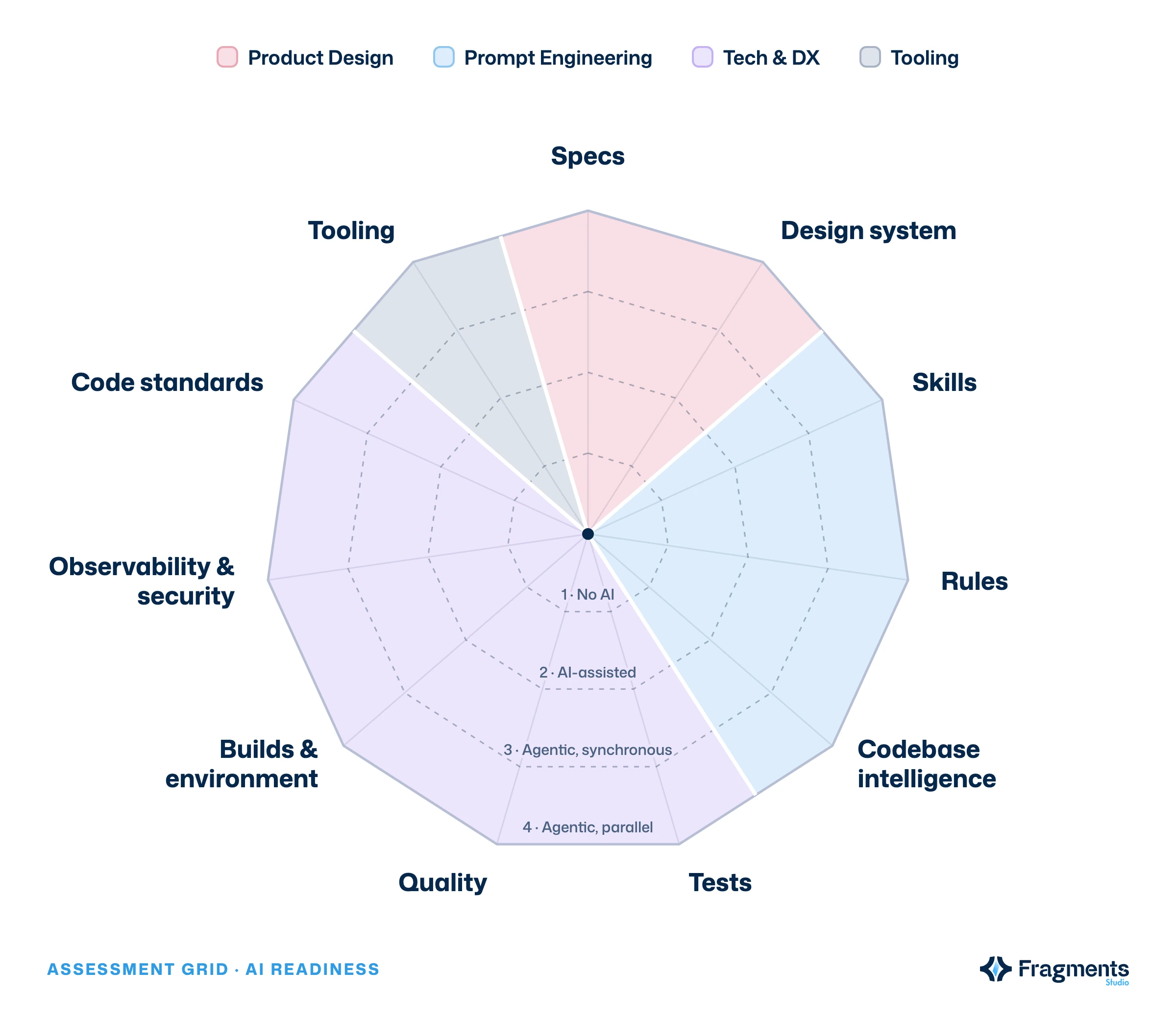
Your team has Cursor or Claude Code licenses, but half of the AI-generated code has to be reworked? The problem rarely comes from the tool. Here is the AI readiness framework we use at Fragments Studio: 11 domains and 4 levels to know what to put in place, and in what order, so that AI really works for you.
The AI readiness (or AI maturity) of a development team measures how far its code, processes and tools allow an AI to produce reliable work without a human going back over it. It plays out across 11 domains grouped into four families: Product Design, Prompt Engineering, Tech & DX and Tooling. Assessed properly, it tells you exactly what to fix to move from autocomplete to agents working in parallel, with a controlled level of security.
AI amplifies what already exists, it does not fix it. That is the central conclusion of the 2025 DORA report on AI-assisted software development: AI acts as an amplifier, magnifying an organization's strengths and weaknesses alike. According to Google Cloud, 90% of the nearly 5,000 professionals surveyed already use AI at work, but its adoption is still tied to lower delivery stability when guardrails are missing.
Developers feel it. In the 2025 Stack Overflow survey, 84% use or plan to use AI, but 46% distrust the accuracy of its answers, against 33% who trust it. And 66% name "almost right, but not quite" solutions as their main frustration.
A controlled study by METR goes further: on open-source repositories they knew well, experienced developers were 19% slower with AI, while believing they had saved 20% of their time. The time spent reviewing and correcting wiped out the gain.
At Fragments Studio, we see the same thing with our clients: the difference between a team that saves time with AI and a team that loses time does not come down to the model it picked. It comes down to the foundation: clear specs, written rules, tests that automatically check the agent's work.
The AI readiness framework distinguishes four levels of AI use, from fully manual work to autonomous agents. Each domain of the framework is scored on this scale.
| Level | Name | What happens |
|---|---|---|
| 1 | No AI | Everything is done by hand. |
| 2 | AI-assisted | Autocomplete and chat, a human drives every step. |
| 3 | Agentic, synchronous | The agent chains multi-step tasks, you supervise live. |
| 4 | Agentic, parallel | Several agents work autonomously, you review their output. |
Our position: a team's real level is capped by its weakest domain. A team equipped with agentic tools but without automated tests stays, in practice, at level 2: every agent output has to be checked by hand. That is why we draw the framework as a radar chart: it shows at a glance the axes holding everything else back.
Each domain answers a single question: does this foundation let an agent work correctly, without anyone going back over its work?
CLAUDE.md, .cursor/rules or the open AGENTS.md format). It holds the project's conventions and, above all, what the agent must never do.Tooling measures the AI tools actually adopted day to day: Claude Code, Cursor or MCP servers. An MCP (Model Context Protocol) server is a standard connector that gives an agent controlled access to your internal tools: tickets, documentation, database. Tooling is the domain where companies invest first, and the one that helps least without the other ten.
Securing an AI agent means limiting what it can see and do, then tracing what it did. An agent that runs commands in your terminal has the same rights as you. Without guardrails, a mistake or a malicious instruction hidden in a file (prompt injection, the top risk in the OWASP Top 10 for LLM applications) can have very real effects.
The rules we apply on our projects:
.env files and keys are excluded from the agent's context, and production secrets are never present on a development machine.Start by assessing yourself, not by buying tools. Here is the order that works best with our clients:
Optimization follows naturally. A well-organized context (short rules, targeted documentation, split tasks) uses fewer tokens and gives better results than a more expensive model used blindly.
This is exactly the outline of the AI Readiness training we already run for some clients who want their developers to be supported: a diagnosis of the team across the 11 domains, then setting up the foundations directly in their own code, so that AI can work in it safely.
What is AI readiness in software development? AI readiness is how prepared a team and its code are for using AI. It is assessed across 11 domains (specs, design system, skills, rules, codebase intelligence, tests, quality, builds, observability and security, code standards, tooling) and 4 levels, from working without AI to autonomous agents running in parallel.
What is the difference between an AI assistant and an AI agent? An AI assistant (autocomplete, chat) suggests code that the developer approves step by step. An AI agent chains several actions on its own, such as reading the code, editing files and running tests, to reach a goal. An agent therefore needs a stronger foundation: written rules, automated tests and controlled permissions.
Should you pick Claude Code or Cursor to get started? The choice of tool matters less than the foundation. Both read rules files, accept MCP servers and work in agent mode. Start with the one your team will actually adopt, then invest in rules, tests and specs, which will stay useful whatever the tool.
How long does it take to move from level 2 to level 3? It depends mostly on the state of your tests and documentation. A team that already has a reliable CI can write its rules and first skills in a few days. Without automated tests, that is the first project, and it conditions everything else.
The productivity gain promised by AI does not come from one more license. It comes from code the agent understands, rules it follows and tests that correct it. The AI readiness framework makes these foundations visible and measurable: 11 domains, 4 levels and a radar chart that tells you where to invest first. Teams that lay these foundations today will be able to hand entire tasks to agents tomorrow, without losing control of their product.
We support tech teams that want to unlock the full potential of AI without sacrificing quality or security.
Follow Fragments Studio on Google
Add us to your preferred sources and our articles get surfaced first in Top Stories, AI Overviews and AI Mode.
 Tech · 6 min
Metabase for SMBs: centralize your data, build dashboards and track your KPIs in real time. A comparison with Power BI and Looker, and the tool's limits.
 Tech · 6 min
Using Cursor as a team in 2026: how to set up .cursorrules, share context, keep your code secure and compare Cursor with Claude Code and Copilot.
 Tech · 7 min
Scalable software architecture for SaaS in 2026: modular monolith or microservices, horizontal scaling, caching, message queues and the mistakes to avoid.
Fragments Studio handles everything: from strategy to production.
Discuss my project